


Description
SMS-GW3 LTE: LTE gateway for sending SMS messages from HWg devices
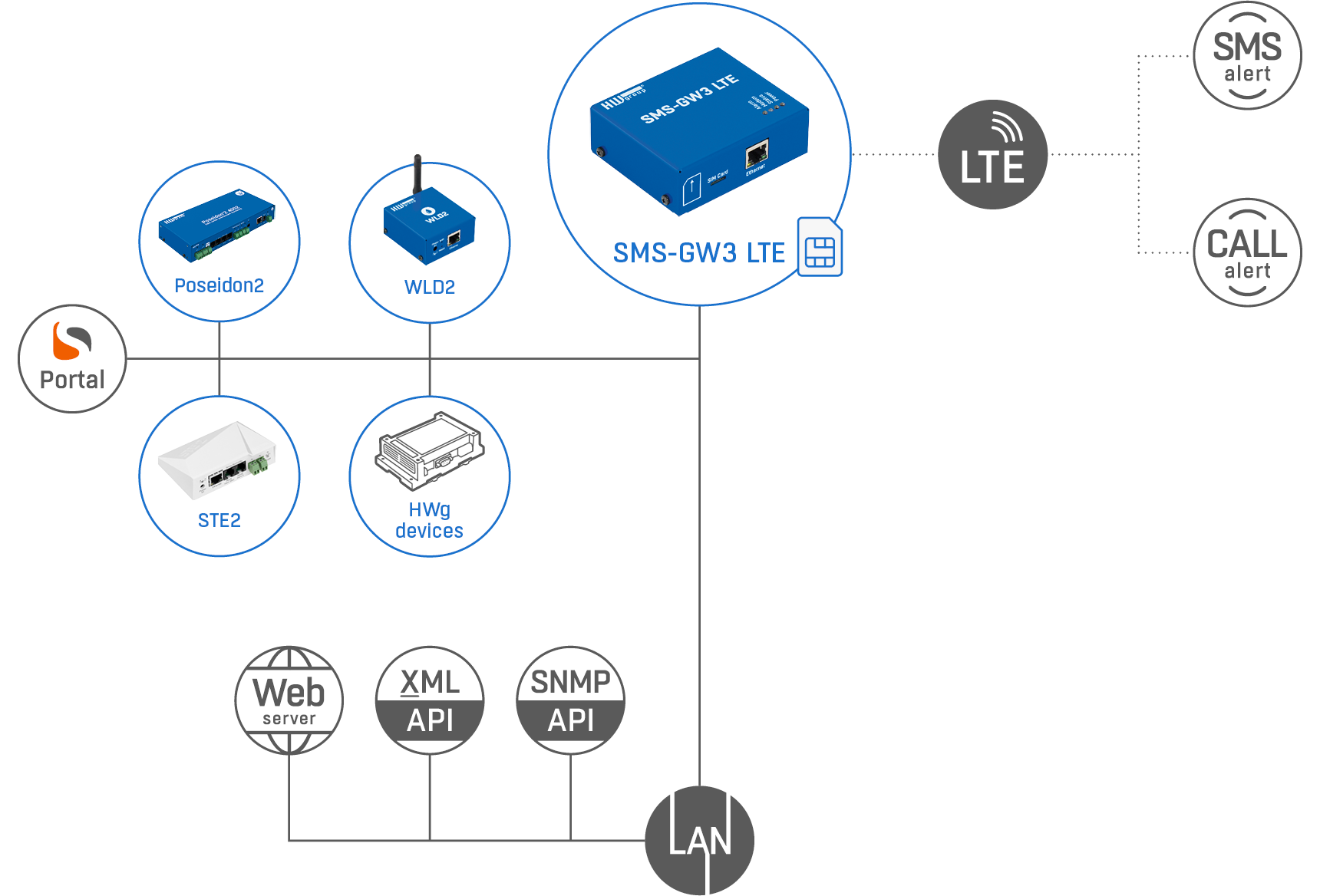
SMS-GW3 LTE is a central gateway that allows HWg devices, SensDesk portals, and third-party software/hardware to send text messages (SMS) and make voice calls alerts.
1) Device-to-GW
Customers with HWg monitoring devices are using one SMS-GW for alerting. Several HWg devices (LAN Thermometer / Energy monitoring) can connect to a single SMS-GW to send alarm alerts (SMS/voice calls) to different phone numbers. No extra software is needed, and it works over the local network using Box-2-Box (Peer-to-Peer) communication.
2) Portal-to-GW
Any installation of SensDesk portal can use the SMS-GW for alerting. The gateway have to be accessible from the portal (either through a VPN or a public IP address).
3) 3th party SW to GW
For third-party (non HWg products) users, the SMS-GW can be usefule gateway for alerting through several Open API.
- HTTP GET
- netGSM (SOAP documented protocol)
- General SNMP (Write)
Features:
- Connectivity: Ethernet (10/100 Mbit/s), LTE
- LTE antenna: External 3m cable, SMA
- Internal memory for outgoing SMS queue: 100 messages
- SMS/Calls GW for all HWg devices (RME)
- SMS/Calls GW for any SNMP software
- SMS/Calls GW for any NAGIOS (plugin by NETWAYS)
- Open API: SNMP, XML, netGSM (http, SOAP)
- Supports the “SMS + Ring” function for combined SMS and ring notifications.
- Mechanical: 76 x 93 x 28 mm, wall-mountable, fits on a DIN rail
Applications and Usage:
- Single SMS gateway for the entire network with an easy-to-use web-based co nfiguration.
- Send text messages without the need for any additional software.
- Configure the recipient’s phone number directly in the sending device.
Device-to-GW: Sending SMS alerts from HWg devices over LAN
Customers with HWg monitoring devices are using one SMS-GW for alerting. No additional software or service is needed, just monitonig device + SMS GW. It’s working over the local network using Box-2-Box (Peer-to-Peer) communication.
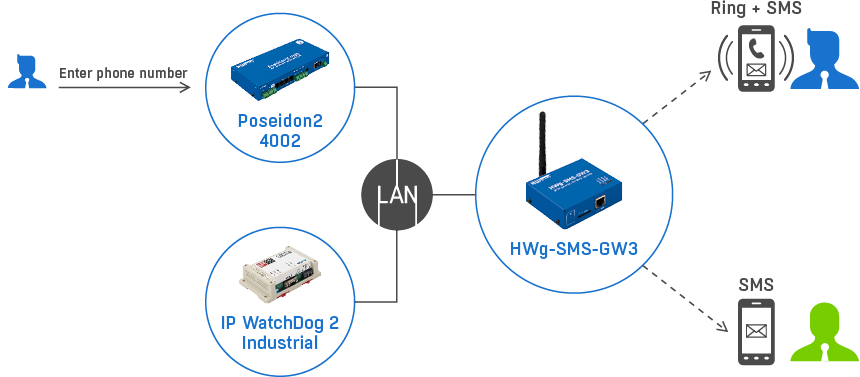
- Poseidon2 4002 & SMS-GW are on the same LAN
- Telephone number of Mr. Blue is defined in the web gui of Poseidon2 4002 (same as SMS-GW IP address).
- Poseidon2 4002 sends an alarm message about a sensor value to Mr. Blue’s phone number via SMS-GW over the LAN.
Alerting use the Device-2-GW mode, no software or portal service is needed. It’s part of RME (Remote Monitoring Ecosystem) - SMS-GW3 LTE contains a SIM card and sends cell message alerts (Ring + SMS) on behalf of all devices in the network.
- One SMS-GW device can be used by several device on the LAN, each device can alert to different recipients (Mt. Green or Blue).
- Message recipients’ phone numbers (Mr. Blue, Mr. Green, …) are configured in the sending device.
- Together with the text message, it is also possible to Ring (Voice call) the recipient and let the phone ring for a short time (configured in the sending device).
Portal-to-GW: Sending SMS alerts from the Portal
Any installation of SensDesk portal (SaaS / On-premise) can use the SMS-GW for alerting. The gateway have to be accessible from the portal (either through a VPN or a public IP address).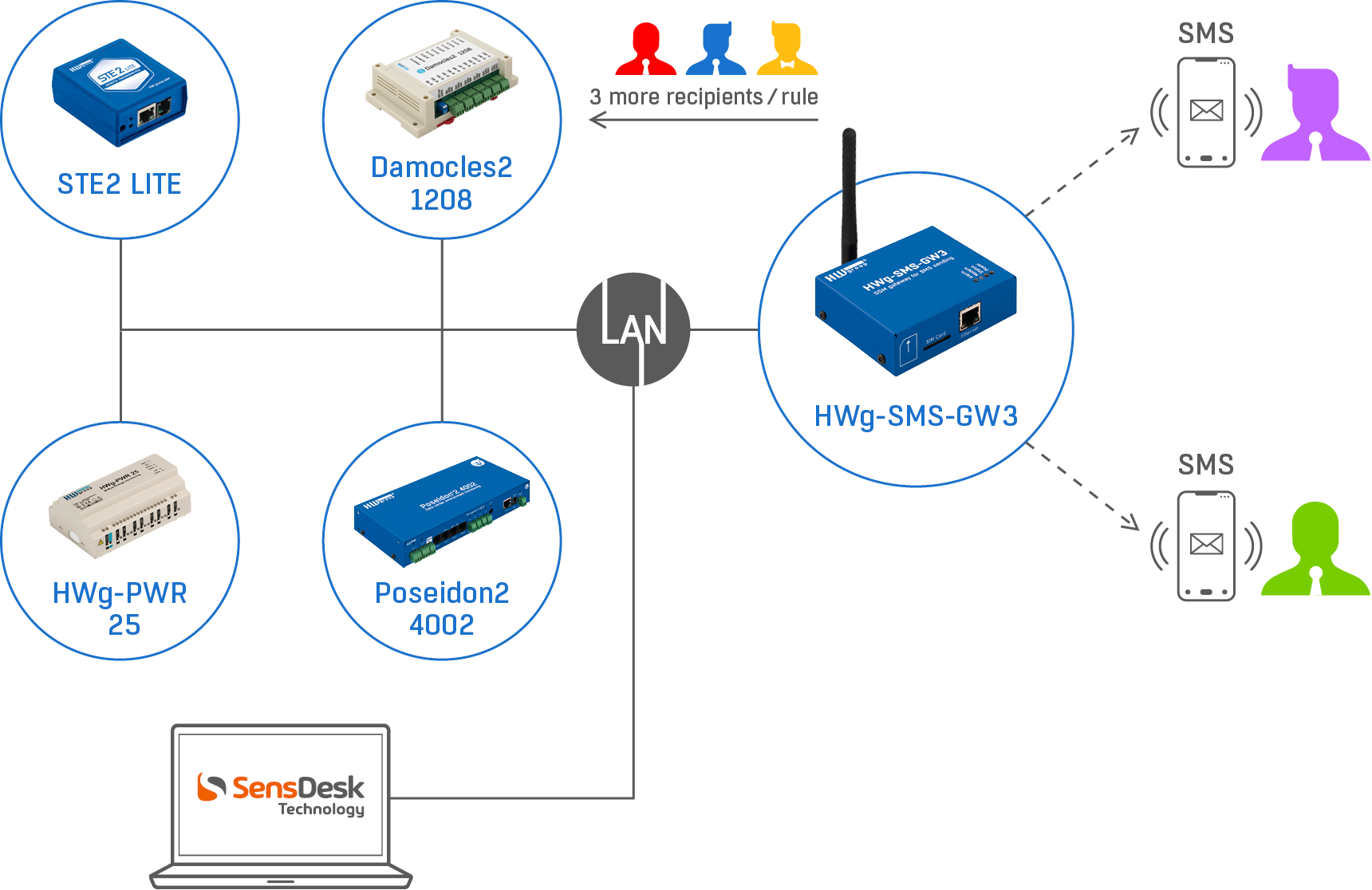
- Any Portal (based on SensDesk Technology) can use the SMS-GW device for sending alerts (Ring + SMS).
- The SMS-GW have to be accessible from the Portal (same LAN / Public IP / VPN)
- One SMS-GW (SIM card / phone number) can be alerting to several recipients (telephone numbers) from several Teams (company accounts) in the Portal.
- All HWg devices are connected to the Portal, based on conditions defined on the Portal are send alert via the SMS-GW.
- Alerting via Portal is more reliable due possibility of Device Invalid Alert (device is disconnected from the Portal cca 60 min)
- Recipients’ phone numbers (Mr. Purple, Mr. Green) are configured in the Portal.
3th party SW to GW
- Using netGSM (SOAP – HTTP POST)
- Using HTTP GET
- Using the SNMP Write function
>> Application note – How to send SMS via HWg-SMS-GW3
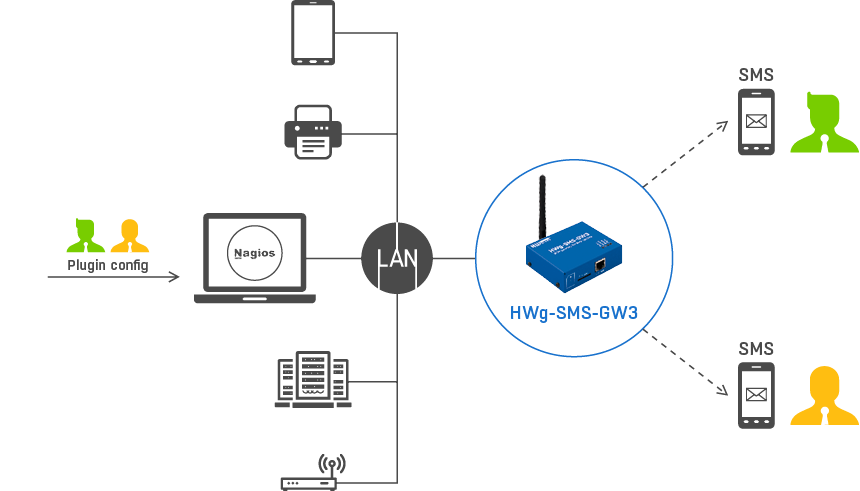
Nagios SMS alerts
 Nagios NMS monitors other devices using SNMP.
- In the Nagios system, a plugin enables SMS alerts over SMS-GW3 LTE gateway.
- The plugin configuration includes the phone numbers of text message al
- The NAGIOS plugin was created in cooperation withrel=”noopener”>Netways(MonitoringExchange: notify-poseidon-sms.pl).
| SMS-GW3 GSM | SMS-GW3 LTE | |
|---|---|---|
| Communication | 2G | LTE |
| Frequency bands | Quad-Band 850/900/1800/1900 MHz | FDD LTE bands: B1/B3/B5/B7/B8/B20 WCDMA bands: B1/B5/B8 |
| Sending SMS from the web | Yes | Yes |
| Open API – netGSM (SOAP – HTTP Post) | Yes | Yes |
| Open API – SNMP write | Yes | Yes |
| HWg devices: Poseidon2 | SMS+ Calls | SMS+ Calls |
| HWg devices: Damocles2 | SMS+ Calls | SMS+ Calls |
| HWg devices: WLD2 | SMS+ Calls | SMS+ Calls |
| HWg devices: STE2 family | SMS+ Calls | SMS+ Calls |
| HWg devices: HWg-PWR | SMS+ Calls | SMS+ Calls |
| SMS + Call from SensDesk.com (Device on fixed IP required) | Yes | Yes |
Plugin for sending SMS from
| Yes | Yes |

Downloads


